

Introduction
Employees working in warehouses, logistics facilities, retail operations and field environments frequently need to access information while moving around.
Returning to a desktop computer every time a product is received, picked, counted or dispatched can slow down operations.
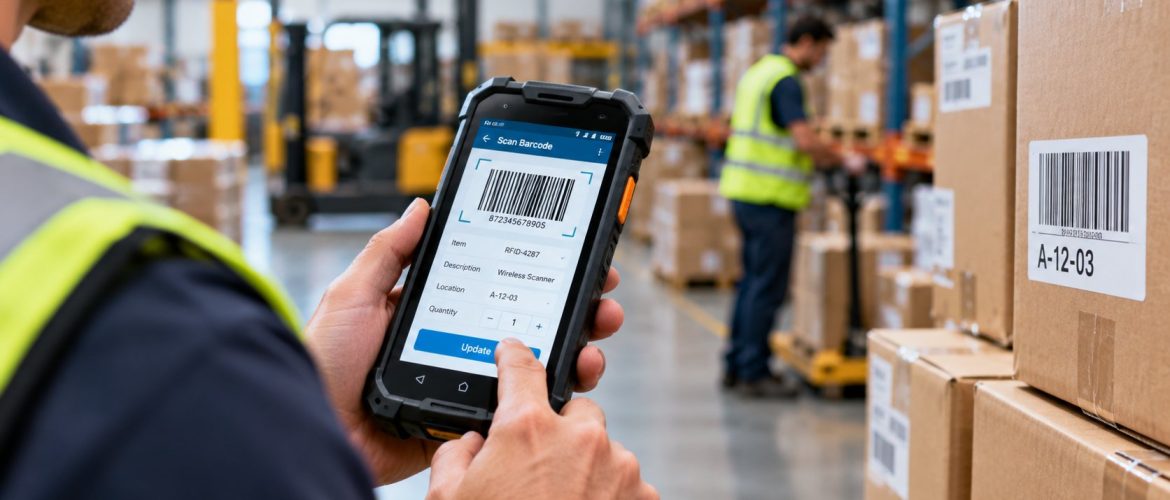
A PDA Device provides another approach. Modern business PDA devices – often described as handheld mobile computers or portable data terminals – can combine barcode scanning with computing and wireless connectivity. An employee can scan a product, retrieve information, verify the task and update the system without remaining at a fixed workstation.
Label Tech UAE’s current product range includes handheld PDA devices as well as mobile computers and portable data terminals for data capture and mobility.
What Is a PDA Device?
A PDA device is a handheld computing device used for mobile data capture. PDA traditionally means Personal Digital Assistant; in modern industrial and commercial environments, the term is often used for rugged handheld computing devices designed for mobile data collection. A typical device combines:
- Touchscreen
- Barcode scanner
- Processor
- Operating system
- Wi-Fi
- Bluetooth
- Mobile connectivity on compatible models
- Camera
- Battery
- Business applications
In practical warehouse use, it can function as both a scanner and a mobile computer.
How Does a PDA Device Work?
A typical workflow might be: Employee scans barcode -> PDA identifies item -> Business software retrieves record -> Employee confirms or updates information -> Data synchronizes with central system.
For example, during stock picking:
- The PDA displays the order
- The employee goes to the storage location
- The rack or product barcode is scanned
- The system verifies the correct item
- The employee confirms the quantity
- Inventory information is updated
The exact workflow depends on the software used by the organization.
PDA Device vs Barcode Scanner
Barcode Scanner
A conventional scanner primarily captures a barcode and sends the information to another device. Label Tech UAE also supplies barcode scanners in Dubai for fixed counters and workstations.
PDA Device
A PDA device may scan the barcode, display information, run an application, store information, communicate wirelessly, allow user input and update business records.
A basic scanner may be enough at a fixed checkout counter. A PDA may be better when employees need to carry the entire workflow with them.
PDA Device vs Smartphone
Modern smartphones are capable devices, but industrial PDA equipment may offer features specifically intended for workplace applications. Depending on the model, these can include:
- Integrated barcode engines
- Rugged enclosures
- Replaceable or extended batteries
- Physical buttons
- Drop resistance
- Enterprise accessories
- Device management options
PDA Devices for Warehouses
Goods Receiving
Employees can scan incoming cartons or products against purchase or receiving records.
Put-Away
The employee can scan the item and its rack or bin location.
Inventory Checking
Workers can move from location to location while performing stock counts.
Picking
The PDA can display required products and allow employees to verify them through scanning.
Packing
Products can be confirmed before they enter the shipment.
Dispatch
Shipment barcodes can be scanned during final movement.
A Typical Warehouse Workflow
A well-planned system may connect: Aisle Board -> Rack Label -> Location Barcode -> Product Barcode -> PDA Device -> Warehouse Management System.
Each component performs a different role. The aisle board helps employees navigate, the rack label identifies a location, the product barcode identifies the stock and the PDA connects these physical references with the software. Clear rack labels and aisle boards make handheld scanning faster and more accurate.
PDA Devices for Inventory Management
Inventory accuracy depends on recording movements consistently. A PDA can allow employees to capture data at the point where the physical activity occurs.
Typical tasks can include stock counting, product lookup, goods receipt, location transfer, picking, dispatch, returns and cycle counts. This reduces the need to write information down and enter it later at a computer.
PDA Devices for Retail
Retail environments can use mobile devices for stock checking, shelf replenishment, inventory counting, product lookup, price verification and back-room stock management. An employee can scan an item while remaining on the shop floor.
PDA Devices for Logistics
Logistics organizations need visibility as products move through several stages. A PDA may be used for parcel identification, sorting, warehouse transfers, loading, delivery workflows and returns processing. Wireless connectivity can allow information to be synchronized as operations progress.
PDA Devices for Manufacturing
Manufacturers may use handheld data capture for raw material receipt, work-in-progress identification, component tracking, production reporting, finished goods and warehouse movements. The device specification should reflect the physical operating conditions.
Important Features to Compare in a PDA Device
1. Barcode Scanning
Confirm whether the device must read 1D barcodes, 2D barcodes, QR codes or Data Matrix codes.
2. Operating System
The operating system must support the applications required by the business.
3. Connectivity
Depending on the workflow, consider Wi-Fi, Bluetooth, cellular connectivity, USB and docking options.
4. Battery Life
Devices used through a long working shift require appropriate battery capacity and charging arrangements.
5. Screen
Consider size, readability, touch operation and glove use where relevant.
6. Durability
Warehouses and industrial environments can expose devices to drops, dust, moisture, temperature changes and continuous handling.
7. Ergonomics
Employees may hold the device for several hours. Weight, grip and button layout can affect usability.
8. Accessories
Depending on operations, businesses may require charging cradles, spare batteries, hand straps, vehicle mounts, holsters and protective accessories.
Choosing the Right PDA Device for a Warehouse
Ask these questions before selecting a model:
- What will employees scan?
- From what distance?
- Which barcode types are used?
- Does Wi-Fi cover the entire facility?
- Which software will run on the device?
- How long is each working shift?
- How often might the device be dropped?
- Will it be used indoors or outdoors?
- Are gloves used?
- How many devices are required?
These questions provide a better basis for selection than comparing specifications alone.
PDA Devices and Barcode Labels
The scanning device is only one part of the system. The labels must also be designed correctly. A barcode label should be clearly printed, correctly sized, high contrast, suitable for the surface and durable enough for its environment.
For warehouse applications, labels may include rack location, product number, barcode, human-readable code, zone, bay and level. Professional barcode printing services help ensure labels scan reliably.
PDA Devices and Asset Tracking
A handheld PDA can also support fixed-asset audits. For example: Scan Asset Label -> Retrieve Asset Record -> Verify Department -> Confirm Condition -> Update Record.
This can be useful for organizations managing large numbers of computers, equipment, machinery, furniture and electronics labelled with durable asset tags and asset labels.
PDA Devices and Mobile Printing
In some workflows, employees may need to scan information and then produce a label. A mobile data-capture workflow can potentially connect: PDA Device -> Application -> Barcode/Label Printer -> New Label. Compatibility should be confirmed between the devices, applications and barcode and label printers.
Common PDA Selection Mistakes
- Buying based only on hardware specifications.
- Ignoring wireless coverage.
- Underestimating battery requirements.
- Choosing the wrong scanner.
- Ignoring device durability.
- Not testing the workflow.
How to Implement PDA Devices
- Map the existing workflow.
- Identify tasks for mobile data capture.
- Confirm software requirements.
- Test connectivity.
- Test barcodes.
- Run a pilot.
- Train employees.
- Monitor performance.
PDA Devices as Part of a Complete Barcode Solution
Businesses can get better results when the entire workflow is planned together. A complete solution may include PDA devices, barcode scanners, barcode printers, barcode labels, barcode ribbons, rack labels, asset labels and barcode printing software.
The equipment should support the same operational objective instead of being purchased as unrelated components.
Choosing a PDA Device Supplier
Businesses should consider product range, scanner types, technical guidance, compatibility assistance, related barcode equipment, support, availability of accessories and understanding of warehouse and inventory workflows.
Label Tech UAE provides handheld devices and related barcode, printing and identification solutions for businesses in Dubai and the UAE.
Conclusion
A PDA Device can bring barcode scanning, business software and mobile computing together in one handheld unit. This makes the technology particularly useful where employees need to capture or access information while moving around a warehouse, retail environment, logistics facility or field operation.
The right PDA should be selected according to barcode type, software, wireless connectivity, battery, environment, durability and user workflow. For the best results, businesses should also consider the quality of barcode labels, printers and underlying data-management system.
To discuss the right handheld device for your operation, contact Label Tech UAE.
Frequently Asked Questions
A PDA device is a handheld computing device used for mobile data capture. Industrial models can combine barcode scanning, a touchscreen, software and wireless connectivity.
PDA traditionally stands for Personal Digital Assistant. In business and warehouse applications, the term is often used for handheld mobile computers or portable data terminals.
Many industrial PDA devices include integrated barcode scanning capability. The supported barcode types depend on the model.
A conventional barcode scanner mainly captures codes and sends the information elsewhere. A PDA can also display, process, store and update information through business applications.
Yes. They can be used for receiving, put-away, picking, inventory counting, transfers, packing and dispatch.
Many enterprise handheld devices support Wi-Fi, while available connectivity varies by model.
Yes, provided the selected device and operating system are compatible with the organization’s inventory application.
Yes. A compatible handheld PDA can scan barcode or QR asset labels and allow employees to verify or update corresponding asset records.
