

Introduction
Businesses depend on accurate labels for products, shipments, inventory, assets and warehouse operations. As the number of products and transactions increases, manually creating and printing labels can become slow, repetitive and difficult to manage.
This is where label printing software becomes valuable.
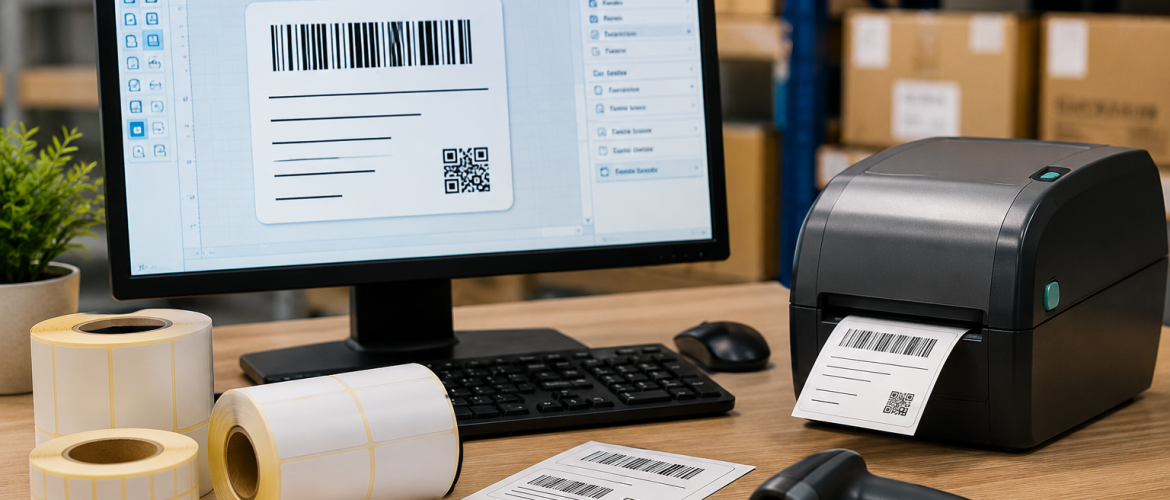
Label printing software allows businesses to design, manage and print labels using structured templates and business data. Depending on the software and setup, it can support barcodes, QR codes, product information, shipping details, batch numbers, serial numbers and other variable information.
For businesses in Dubai and across the UAE, the right software can help improve printing accuracy, reduce repetitive work and support more organised labelling processes. Label Tech UAE provides labelling and barcoding solutions for businesses, including label printing software and related equipment.
This guide explains what label printing software is, how it works, which features matter and how businesses can choose a solution that fits their operations.
What Is Label Printing Software?
Label printing software is a program designed to create, manage and print labels.
Instead of designing each label manually, users can create reusable templates. Once a template has been created and approved, employees can use it repeatedly while changing only the information that needs to be updated.
A template may include:
- Company logo
- Product name
- Product code
- Barcode
- QR code
- Price
- Batch number
- Serial number
- Manufacturing date
- Expiry date
- Shipping information
- Customer details
Variable information can then be added automatically or entered when the label is printed.
This is especially useful for businesses that need to produce large quantities of labels containing different information.
Why Do Businesses Need Label Printing Software?
A basic word-processing or design program may be sufficient for occasional labels, but it becomes less practical when a business needs to produce hundreds or thousands of labels.
Dedicated label printing software can provide greater control over:
- Label dimensions
- Printer settings
- Barcode generation
- Variable data
- Templates
- Database connections
- Printing workflows
- User permissions
The goal is not simply to make labels look better. The goal is to make the entire labelling process more efficient, consistent and reliable.
For example, an e-commerce company may receive hundreds of orders every day. Instead of manually creating every shipping label, the company can use a template and populate it with order-specific information.
Key Benefits of Label Printing Software
1. Faster Label Production
Reusable templates mean employees do not need to create each label from scratch.
Once a template is approved, users can enter or retrieve the required information and print the label.
This can be particularly useful for businesses with high-volume printing requirements.
2. Improved Accuracy
Manual copying of product codes, addresses and other information can result in errors.
Software-based workflows can reduce repetitive data entry, especially when integrated with business systems.
For example, product information can be retrieved from a database rather than manually typed into every label.
3. Consistent Label Design
A central template helps ensure that labels follow the same layout.
This is important for companies with multiple products, departments, branches or locations.
Consistent templates can also make it easier for employees to recognise important information quickly.
4. Barcode and QR Code Support
Many label printing applications support barcode and QR code generation.
This can help businesses create labels for:
- Inventory
- Products
- Assets
- Shipments
- Warehouses
- Documents
The barcode must also be compatible with the scanning equipment used by the organisation. Businesses can pair their software with suitable barcode scanners to create a more efficient identification and tracking workflow.
5. Variable Data Printing
Different labels can contain different information while using the same template.
For example:
Label 1: Product A — Batch 1001
Label 2: Product A — Batch 1002
Label 3: Product B — Batch 1003
The design remains consistent while the data changes.
This is useful for batch numbers, serial numbers, shipping information, expiry dates and other changing data.
What Features Should You Look for in Label Printing Software?
Choosing software should begin with the actual needs of your business.
Different organisations have different requirements. A small retailer may only need basic product labels, while a large warehouse may require database integration, barcode support and automated printing.
Template Design
The software should make it easy to create and edit label templates.
Look for options such as:
- Text fields
- Images
- Barcodes
- QR codes
- Shapes
- Tables
- Variable data fields
Templates should also be easy to save, modify and reuse.
A good template system can help businesses maintain consistent layouts across different products and departments.
Barcode Support
If your business uses barcodes, barcode support should be a major consideration.
The software should support the barcode formats required by your business and provide control over:
- Barcode size
- Position
- Human-readable text
- Data fields
- Print quality
The barcode must also be compatible with the scanners used by your organisation.
Businesses can combine label printing software with barcode scanners to support product identification, inventory management and asset tracking.
A barcode that is poorly positioned, incorrectly sized or printed with insufficient quality may fail during scanning. Testing the final printed label with the actual scanner is therefore important.
QR Code Printing
QR codes can contain more information than traditional linear barcodes.
Businesses may use QR codes to connect physical products with digital information such as:
- Product pages
- Manuals
- Verification information
- Digital records
- Internal tracking systems
- Service information
If your business requires QR codes, check whether the software supports the required QR format and data volume.
It is also important to ensure that the final printed QR code is large and clear enough to scan reliably.
Printer Compatibility
Software is only useful if it works properly with your printing hardware.
Before selecting software, check compatibility with your existing or planned barcode and label printers.
Businesses should consider:
- Printer brand
- Printer model
- Print resolution
- Label width
- Printing speed
- Direct thermal printing
- Thermal transfer printing
The printer, software and label material should work together to produce clear and consistent results.
For example, a warehouse with high printing volumes may require a different printer setup from a small retail business printing only a few labels each day.
Support for Different Label Sizes
Businesses rarely use only one label size.
A retailer may need small product labels, while a warehouse may require larger carton or shipping labels.
Good label printing software should allow businesses to create multiple templates for different dimensions.
This makes it easier to manage:
- Product labels
- Shipping labels
- Barcode labels
- Asset labels
- Inventory labels
- Warehouse labels
Having multiple approved templates can also prevent employees from repeatedly creating new layouts for common applications.
Variable Data Printing
Variable data is one of the most important capabilities for businesses with high-volume labelling requirements.
Instead of manually changing each label, the software can pull different data into the same template.
Examples include:
- Serial numbers
- Batch numbers
- SKU numbers
- Customer names
- Addresses
- Prices
- Expiry dates
- Tracking numbers
This can significantly simplify repetitive labelling tasks.
For example, a manufacturer can use one approved label template while automatically changing the batch number and production date for every production run.
Database and ERP Integration
For growing businesses, integration can be more important than design features.
If your product or inventory information already exists in an ERP, WMS or database, label printing software may be able to use that information instead of requiring employees to type it manually.
A typical workflow may look like this:
ERP/WMS → Product Information → Label Software → Printer → Printed Label
This workflow can reduce duplicate data entry and help improve consistency.
Before purchasing software, identify which systems your business currently uses and check whether integration is available.
Important questions include:
- Can the software connect to your database?
- Can it import product information?
- Can it retrieve order information?
- Can it generate labels automatically?
- Can it work with your existing ERP or WMS?
The answers can help determine whether a particular solution is suitable for your business.
Warehouse Management and Label Printing
Warehouses often need labels at multiple stages of their operations.
Labels may be required for:
- Receiving
- Storage
- Picking
- Packing
- Dispatch
- Returns
- Asset identification
Label printing software can help standardise these processes.
For example, when goods arrive at a warehouse, employees can print labels containing product codes and storage information.
At the picking stage, barcode labels can help employees identify the correct items.
For larger warehouse projects, businesses may also require rack labels and aisle boards to identify storage locations and improve warehouse organisation.
Combining rack identification with barcode-based workflows can make it easier for warehouse employees to locate products and manage stock.
Label Printing Software for Shipping
Shipping operations require accurate information.
A shipping label may contain:
- Sender details
- Recipient details
- Tracking number
- Order number
- Barcode
- Delivery instructions
Printing software can help businesses generate consistent shipping labels based on order data.
This can be especially valuable for e-commerce companies processing a large number of orders every day.
A typical workflow may be:
Customer Order → Order Processing → Shipping Data → Label Generation → Printing → Package Dispatch
Automating as much of this workflow as possible can reduce manual data entry and improve shipping efficiency.
Label Printing Software for Manufacturing
Manufacturers often need labels throughout the production process.
Labels can be used for:
- Raw materials
- Work-in-progress products
- Finished goods
- Batches
- Production dates
- Serial numbers
- Pallets
Software can help standardise the information printed at each stage.
Where production data changes frequently, variable-data printing can be particularly useful.
For example, the same label template can be used for different production batches while automatically changing the batch number, manufacturing date and serial number.
Label Printing Software for Retail
Retailers can use software to create labels for:
- Products
- Prices
- Inventory
- Shelves
- Promotions
- Stock transfers
When products and prices change frequently, reusable templates can make label production more efficient.
Barcode support can also help retailers connect physical products with inventory and point-of-sale systems.
Label Printing Software for Asset Tracking
Businesses with large numbers of computers, equipment or other assets can use labels containing unique asset identifiers.
A typical asset label may include:
Company → Asset ID → Serial Number → Barcode
When the barcode is scanned, employees can access the corresponding asset record.
For harsh environments or long-term identification, businesses may need specialised asset tags and asset labels rather than standard paper labels.
The appropriate material should depend on the asset’s environment, handling requirements and expected lifespan.
Cloud-Based vs Desktop Label Printing Software
One important decision is how the software will be deployed.
Desktop Software
Desktop software is installed on individual computers.
It may be suitable for businesses where:
- Printing occurs from specific workstations
- Internet access is limited
- A local setup is preferred
- Printing operations are managed from a fixed location
Desktop solutions can be straightforward for smaller operations with limited users.
Cloud-Based Software
Cloud-based systems can offer access from multiple locations, depending on the platform.
They may be useful for businesses with:
- Multiple branches
- Remote teams
- Centralised template management
- Distributed printing requirements
The right choice depends on your IT environment, security requirements, operational workflow and the number of locations involved.
Security and User Permissions
Businesses should not overlook security.
If multiple employees can create or edit labels, uncontrolled changes can result in incorrect information being printed.
Useful controls may include:
- User accounts
- Permission levels
- Template approval
- Access restrictions
- Activity records
- Backup and recovery
For larger organisations, central control over templates can help maintain consistency.
For example, employees may be allowed to print approved templates without having permission to modify the design or barcode structure.
How to Choose Label Printing Software
Follow these steps before making a decision.
Step 1: Identify Your Labelling Requirements
List everything you need to print.
For example:
- Product labels
- Shipping labels
- Barcode labels
- Asset labels
- Inventory labels
- QR labels
Understanding your requirements before comparing software can prevent you from paying for unnecessary features.
Step 2: Determine Your Printing Volume
Estimate how many labels you print:
- Per day
- Per week
- Per month
A small business may have very different requirements from a large warehouse.
Printing volume can influence your choice of software, printer and overall labelling setup.
Step 3: Check Printer Compatibility
Confirm that the software works with your printers.
If you already own barcode or thermal printers, verify compatibility before purchasing new software.
Step 4: Check Barcode Requirements
Identify the barcode formats required by your business.
Also consider whether you need:
- QR codes
- Serialisation
- Batch numbers
- Variable barcodes
- Multiple barcode formats
Step 5: Check Data Integration
Determine whether the software can connect to your ERP, WMS, database or other business systems.
This is particularly important for businesses that already have large product or inventory databases.
Step 6: Evaluate Templates
Make sure employees can easily create and modify templates.
Also consider whether templates can be protected or approved by administrators.
Step 7: Consider Future Growth
Do not select software only for today’s requirements.
Consider whether you may need:
- More users
- More printers
- More locations
- More products
- More complex data
- Automation
A scalable solution can help businesses avoid replacing their software as operations expand.
Common Mistakes When Choosing Label Printing Software
Choosing Based Only on Price
The cheapest software may not provide the integrations or features your business needs.
Instead of comparing only purchase prices, consider the total cost of ownership, including support, maintenance, training and future upgrades.
Ignoring Printer Compatibility
Always confirm compatibility before purchasing.
The software should work with the printer models and label formats required by your business.
Not Testing Barcodes
A barcode that looks correct may still fail to scan.
Test labels with the actual scanners used in your business before starting large-scale printing.
Overlooking User Training
Even good software can create problems if employees do not understand how to use it.
Provide basic training on:
- Template selection
- Data entry
- Printing
- Barcode checking
- Printer settings
- Troubleshooting
Not Planning for Growth
A solution that works for 500 labels per month may not be suitable when the business reaches 50,000 labels.
Consider future printing volumes and operational requirements before making a final decision.
How to Improve Label Printing Efficiency
Once software is installed, businesses can improve results by standardising their workflow.
Create Approved Templates
Avoid allowing every employee to create their own version of a label.
Create standard templates for common applications and control who can modify them.
Standardise Label Sizes
Where possible, reduce unnecessary variation.
Using a limited number of standard label sizes can simplify purchasing, storage and printing.
Connect Data Sources
Automate data transfer from business systems.
This can reduce manual data entry and improve consistency.
Use Barcode Verification
Check barcode readability before large production runs.
Testing can help identify problems with label size, print quality, positioning or printer settings.
Maintain Printers
Clean and service printers regularly to maintain print quality.
Businesses that depend on labelling equipment can also consider service and maintenance solutions to keep their printing and scanning equipment operating reliably.
Label Printing Software and Label Printers: Why Both Matter
Software and hardware should be considered as one complete system.
Even the best software cannot compensate for an unsuitable printer or poor-quality labels.
A complete labelling setup may include:
Label Printing Software → Barcode/Label Printer → Plain or Printed Labels → Barcode Scanner → Business System
Each component has a role.
Businesses can explore plain labels for blank-label applications and printed labels for pre-printed requirements.
The software should then work with the selected printer and business data to produce consistent labels.
Why Choose Label Tech UAE for Labelling Solutions?
Choosing software is only one part of building an effective labelling system.
Businesses may also require:
- Compatible label printers
- Plain labels
- Barcode ribbons
- Barcode scanners
- Asset labels
- Rack labels
- Printing services
- Software support
- Equipment maintenance
Label Tech UAE provides labelling and barcoding solutions for businesses in Dubai and across the UAE.
Its range of products and services covers different parts of the labelling workflow, including plain labels, printed labels, barcode and label printers, barcode scanners, rack labels, asset labels and label printing software.
Businesses looking for a complete labelling solution can explore Label Tech UAE’s products and services to find solutions suited to their printing, barcode, inventory and identification requirements.
Conclusion
Choosing the right label printing software can improve the way a business creates, manages and prints labels.
The ideal solution should match your printing volume, label types, printers, barcode requirements and business systems. Features such as reusable templates, variable-data printing, barcode support, printer compatibility and system integration can make a significant difference.
Businesses should also consider scalability, security, user permissions, training and technical support before making a final decision.
Most importantly, software should be evaluated as part of the complete labelling workflow rather than as a standalone product.
When combined with suitable labels, printers, scanners and support services, label printing software can help businesses create a more organised and efficient labelling operation.
For businesses in Dubai and across the UAE, Label Tech UAE provides a range of labelling, barcoding, printing hardware and software solutions to support different operational requirements.
Frequently Asked Questions
What is label printing software?
Label printing software is used to design, manage and print labels. It can support templates, barcodes, QR codes, variable data and other printing requirements.
Why should businesses use label printing software?
It can help improve printing speed, consistency and accuracy, especially when businesses produce large quantities of labels.
Can label printing software print barcodes?
Yes. Many label printing applications support different barcode formats and allow businesses to create barcode-based labels.
Can label printing software connect to an ERP or inventory system?
Some solutions can integrate with ERP, WMS, databases and other business systems. Businesses should confirm compatibility with their specific systems before purchasing.
Does label printing software work with thermal printers?
Many label printing applications are designed to work with thermal and thermal-transfer printers, but compatibility should be confirmed for the specific printer model.
Is label printing software useful for warehouses?
Yes. Warehouses can use it for inventory labels, rack labels, shipping labels, barcode labels, pallet labels and other identification requirements.
Where can I find label printing solutions in Dubai?
Label Tech UAE provides label printing software along with barcode printers, scanners, labels and other labelling solutions for businesses in Dubai and across the UAE.
